
MQTT protocol applied to Heat Networks.
See also https://github.com/heatweb/heat-network for the GitHub project hosting the protocol.
network_id / publisher_id / device_id / data_group / key = value
myHeatNetwork/plantroomController1/primaryHeatNetwork/stat/percentDistributionLossesJanuary2019 = 10.34 (network distribution losses)
myHeatNetwork/plantroomController1/boiler1/alarm/tOut = low temperature (boiler low temperature alarm)
myHeatNetwork/plantroomController1/boiler2/alarm/tOut = ok
myHeatNetwork/plantroomController1/boiler2/dat/run = 1
myHeatNetwork/ab34c23Z/hiu0198984733686/dat/fC = 3.2 {HIU, tap flow rate)
myHeatNetwork/ab34c23Z/hiu0198984733686/settings/prepayRun = 1 {HIU, prepay isolation)
myHeatNetwork/ab34c23Z/hiu0198984733686/set/prepayRun = 0 {HIU, command to isolate on prepay)
myHeatNetwork/ab34c23Z/hiu0198984733686/hm/kwh24h = 13.3 {HIU heat meter, energy used over past 24 hours)
myHeatNetwork/ab34c23Z/blockB2/hm/kwh24h = 1204.3 {residential building heat meter, energy used over past 24 hours)
To Consider
The starting point for the unified heat network protocol is what the industry has already - the SAP Product Characteristics Database (PCDB).
The aim is to expand this data schema to create a framework that enables the description and communication of any data concerning heat networks, from the overall network performance data down to the setpoints on individual components.
At the same we wish to ensure traceability of data, as well as the ability to filter and group data, and to enable assignment of read or write permissions to clients.
To achieve this we are using a standard 5 level MQTT topic structure, along with the associated JSON structure.
We also want to look at Project Haystack, in an attempt to make the protocol compatible with as many other systems as possible.
- Naming policies want to be descriptive, but short in order to save data during transmission.
- Haystack used camel case naming, where names start in lowercase, with a capital used for the start of each 'tag'. e.g. primaryInTemp, (or preferably) tH
- MQTT topics (our filing system) want to follow a structured approach that provides a high degree of filtering.
- Once a complete working data description for a piece of equipment has been defined, they should be numbered to standardise Modbus Registers where used
Extended Protocol
MQTT topics can have more layers, however doing so makes unified handling more complex.
The protocol will be updated to allow for more than the 5 standard layers.
The only rule is that the 6th (first additional topic) is an attribute, goes at the end, and replaces the standard value with a value attribute.
network_id / publisher_id / device_id / data_group / key / attribute = attribute value
myHeatNetwork/ab34c23Z/hiu0198984733686/dat/fC/value = 3.2
myHeatNetwork/ab34c23Z/hiu0198984733686/dat/fC/title = HIU, tap flow rate
myHeatNetwork/ab34c23Z/hiu0198984733686/dat/fC/units= ltr/min
Further levels go at the start, and will normally be used to describe complex heat network heirarchy.
allNetworks/London/KT4/myHeatNetwork/ab34c23Z/hiu0198984733686/dat/fC/value = 3.2
Uses for Data Structure
- Heat Network performance monitoring
- Device monitoring and alarming
- Specification of operational parameters
- Commissioning checks
- User/engineer commands
- Connecting isolated systems to add new functionality (e.g. billing & hiu control)
- Combining data for sanity checks (e.g. heat meter sensors & hiu sensors for tamper alarming)
Tags and Camel Case
The point of this protocol is to standardise naming, so it is important to try as best as possible to adhere to a code, so it is possible to deduce a new name from existing practices.
Project Haystack uses tags and camel casing to deduce names. Camel case uses lower case lettering, with the start of each new tag in uppercase, making it possible to split the name into parts. As many systems, including MQTT, are case-sensitive, it is important to adhere to the strict naming.
anExampleOfACamelCaseName
We have adopted the practice of using the first tag in a name for the units of the name, if there is one. Some examples are:
| Tag | Description | Units |
|---|---|---|
| t | Temperature | °C |
| p | Pressure | bar |
| dp | Differential pressure | bar |
| v | Volume | litres |
| m3 | Volume | m3 |
| f | Flow rate | litres/minute |
| m3h | Flow rate | m3/h |
| kw | Power | kW |
| n | Number | Number value |
| xp | Percentage position | % |
| json | JSON structured data | JSON |
| html | HTML structured data | HTML |
| csv | Comma separated values | CSV |
The second tag (or further tags) would then be the noun the prefix belongs to:
| Tag | Description | Used in |
|---|---|---|
| H | Hot circuit inlet | Plate heat exchangers |
| Ho | Hot circuit outlet | Plate heat exchangers |
| C | Cold circuit | Plate heat exchangers |
| Co | Cold circuit outlet | Plate heat exchangers |
| CH | Central Heating inlet | Plate heat exchangers, zones |
| CHo | Central Heating outlet | Plate heat exchangers, zones |
| DHW | Domestic Hot Water | various |
| In | Inlet | Pumps, boilers |
| Out | Outlet | Pumps, boilers |
| F | Flow | Heat meters |
| R | Return | Heat meters |
| V | Valve | Plate heat exchangers, zones |
Sometimes an object could be described by one or more tags, and the context of use may then decide the selection.
Prefix and noun tags are combined to form complete tags.
| Tag | Description |
|---|---|
| tCo | Temperature cold outlet from a plate heat exchanger |
| xpV | Valve position in percent |
Further tags or numbering can be added where needed.
MQTT Topic Structure
MQTT topics are similar to directories and files on a computer. They describe where data goes, as well as the type of data.
network_id / node_id / device_id / data_group / key = value
We have, through trial and error, arrived at this 5 level structure to enable permissions to be granted based on the network, the device or system in question, and the type of data.
The node_id refers to the network device (typically running Node-RED) that connects to a MQTT server, as as such is the MQTT user name. A publishing device may collect data for one or more devices.
The network_id and device_id form the basis of global device identification, and must be a unique combination. Different nodes can then post data on this device.
The structure translates into two forms of information - FACTS and OPINIONS.
FACTS are provided by the Node to which the device runs on physically. OPINIONS are data provided by other nodes (about the device), such as calculations and statistics. Alarms, for example, can either come from the device itself (facts), or can be generated by a remote server watching data and generating further alarms (opinions). This also corms the basis of redundant data points, which would be an opinion based on facts from, for example, redundant sensor systems such as an HIU and a heat meter.
A simple 5 (minus node = 4) level structure also translated into browsers and JavaScript (what you are looking at now), with it been possible to fix references in 'web pages' to a topic. For example, #n-boilers-dat-tF is the common reference in objects to the common boiler flow temperature. It can be referenced in graphics (SVG) as a class typically, allowing text and colours to be altered to refer to the data point. By following the standardised structure, graphics objects can be reused, and code can be common across applications. We ignore the node_id as it is part of the MQTT subscription process that decides where (which node) information comes from. It is still possible to go off-piste and refer to nodes, indeed this extra 'space' for custimisation.
| Level | Description. |
|---|---|
| network_id | A unique identifier for the heat network. |
| node_id | A network unique identifier for node to which further devices are connected. |
| device_id | A network unique identifier for the connected device (e.g. HIU serial number) or sub-system (e.g. phex1) |
| data_group | The type of data. This is used for basic grouping, and for controlling data access (e.g. settings). |
| key | An identifier for the data. |
Data Groups
| Group | Description |
|---|---|
| dat | General data from sensors and equipment |
| stat | Statistical, summary and calculated data, as well as general information (that may change) |
| settings | Equipment settings |
| set | Command to adjust a persistent setting (remains after restart) |
| cmd | Command to perform an action. |
| warning | Warning (of a failure) |
| alarm | Alarm (a failure e.g. equipment goes out of warranty terms) |
| system | Data relating to communications |
| info | Information that cannot change (not implemented yet, with stat been used as default) |
| Argument to move serial numbers, manufacturers and models to info | |
| pcdb | PCDB formatted data |
Example statistics:
network_id/+/network/stat/# (network stats)
network_id/+/+/stat/# (all stats)
network_id/+/subSt/stat/# (substation stats)
network_id/+/boilers/stat/# (boiler stats)
MQTT Permissions
Topics allow read or write permissions to be assigned to users on an MQTT server based on the topic levels and wildcards.
A device (publisher_id) publishing data to the server would typically have read and write permissions for
network_id/publisher_id/#
The # covers all further topic sub-levels.
One could allow a maintenance company to subscribe to warnings, alarms, from all devices on a network by giving read permission for
network_id/+/+/alarm/#
network_id/+/+/warning/#
network_id/+/block_id/stat/htmlReport
The engineer would receive all alarms and warning generated by the system (to a mobile app for example) along with the full topic, thereby providing tractability to the source of the alarm through the network and device levels in the topic structure.
PCDB Fleld 2 Example
Field 2 of the PCDB refers to the heat **network '**pcdb', version Number.
network_id/publisher_id/network/pcdb/verN = value
pcdb_921/ab45de1998ca/network/pcdb/verN = 2
| Level | Description. |
|---|---|
| network_id | Community heat network index number from PCDB database. |
| publisher_id | An unique identifier for the MQTT client publishing data on behalf of the device/system. |
| device_id | network |
| data_type | pcdb |
| key | verN |
| value | version number |
PCDB Fields
The SAP Product Characteristics Database (PCDB) stores performance data for heat networks.
The following is taken from the PCDB, with MQTT topic tags added using abbreviated camel form.
The full topic would start with:
network_id/publisher_id/network/pcdb/mqtt_key
Where network_id is the network index number (= field 1), and publisher_id is the user name for access to the database.
| Field | X | Field name | Description | MQTT Key |
|---|---|---|---|---|
| 1 | Community heat network index number (digits) | Unique index number for each network, assigned automatically by database software and used for control and reference purposes. (See 7.1). | idN | |
| 2 | X | Community heat network version number (2 digits) | Network version for the network identified in field 1 It is numbered from 1 upwards and incremented if the network is extended and when equipment data is amended (for example a change to a heat generator) or if the energy use information is updated. | verN |
| 3 | DB entry updated | |||
| (yyyy/mmm/dd hh:mm) |
| Date and time this record was created or last amended by the database administrator. | dateTime | | 4 | | Description of network
(up to 255 chs)
| A short description identifying the dwellings to which the network version applies.
Where the network is constructed in phases this may also indicate which phases are connected.
| des | | 5 | X | Validity end date
(yyyy/mmm/dd)
| The last day of validity of this data record. Dwellings assessed after this date use a
data record with a higher network version number (in the case of new dwellings the applicable assessment date is that of the as-designed assessment). Blank if there is no record with a higher network version number.
| dateValidUntil | | 6 | | Community heat network name
(up to 50 chs.)
| The name by which the community heat network is known. | name | | 7 | | Postcode of the Primary
Energy Centre (up to 8 chs)
| The postcode of the energy centre providing heat for the network. Where there is
more than one energy centre, it is the postcode for the energy centre supplying the largest amount of heat
| postcodeEc | | 8 | | Locality
(up to 35 chs.)
| The locality in which the community heat network is situated. May be blank. | lacality | | 9 | | Town name
(up to 30 chs.)
| The post town nearest to the community heat network. | town | | 10 | | Administrative area
(up to 30 chs.)
| The administrative area in which the community heat network is situated. May be
blank.
| areaAdmin | | 11 | | Date of initial operation
(yyyy/mmm/dd)
| The date on which the energy centre was commissioned (or re-commissioned if the
network is extended) to serve all dwellings included in the assessment. Blank if it is not yet operational or if the assessment includes dwellings not yet connected.
| dateOn | | 12 | | Total number of dwellings
included (up to 5 digits)
| The total number of dwellings included in the assessment of the heat network. | nPropTotal | | 13 | | Number of flats (up to 5
digits)
| The number of flats included in the assessment of the heat network | nFlats | | 14 | | Non-domestic floor area
connected (up to 6 digits)
| The floor area of any non-domestic buildings connected to the heat network. | faNonDom | | 15 | | Total number of existing
dwellings (up to 5 digits)
| The number of dwellings which have been constructed. This can be less than the
number in field 12 if the assessment included dwellings not yet constructed.
| nPropExist | | 16 | X | Service provision
(1 digit)
| Service provision, encoded as: 1 space and water heating; 3 space heating only;
4 water heating only. If a network has separate systems for space heating and water heating, there will be a record for each.
| serProv | | 17 | X | Provisional or actual data
(1 digit)
| Whether the record represents provisional (estimated) data or actual recorded data,
encoded as 1 or 2 respectively. Provisional data may be assigned to new networks for which recorded data are not yet available.
| provAct | | 18 | X | Year
(4 digits)
| The calendar year to which the data relates. Blank if provisional data. | year | | 19 | | Heat metering on supply to
network (1 digit)
| Whether the heat supplied to the network from the energy centre is metered. 1 for
yes. 0 for no
| isSupplyMetered | | 20 | | Total MWh of heat per
annum supplied to network (up to 6 digits)
| The annual amount of heat supplied to the network by the plant in the energy centre. |
kwhYAvr kwhJanAvr kwhFebAvr kwh2018 kwhJan2018
| | 21 | | Total MWh of heat per
annum delivered to customers (up to 6 digits)
| The annual amount of heat delivered to all customers (dwellings and non-domestic),
thereby indicating the scale of the network.
| mwhPa | | 22 | | Individual dwelling heat
metering (1 digit)
| Whether the supply of heat to each individual dwelling is metered.1 for yes, 0 for no | isPropMetered | | 23 | | Total MWh of heat per
annum delivered to dwellings (up to 6 digits)
| The annual amount of heat delivered to dwellings. | mwhPpropPa | | 24 | | Distribution route length in
metres (up to 6 digits)
| The total length of the network heat distribution pipework route. In the case of
underground pipework it is the total trench length containing pipework plus any internal distribution route within apartment block risers and laterals. It includes both flow and return water pipes i.e. it is not the sum of the flow and return pipework.
| lenPipeTotal | | 25 | | Linear loss
(up to 7 digits eg xxx.xxx)
| The average heat loss per metre length of network heat distribution pipework route in
W/m.
| lossLinear | | 26 | X | Distribution loss factor
(up to 4 chs, e.g. x.xx)
| Factor that allows for losses from the heat distribution network, see SAP section C3.
Applicable to all connected premises.
| lossFactorLinear | | 27 | | Pumping electrical energy
(up to 6 digits, e.g. xxxxxx)
| Annual electrical energy for pumping in the heat distribution network in kWh/year. | kwhPumpPa | | 28 | X | Pumping electrical energy
per dwelling (up to 6 digits, e.g. xxxx.xx)
| Annual electrical energy for pumping in the heat distribution network attributed to
each dwelling, in kWh/year.
| kwhPumpPpropPa | | 29 | | Carbon dioxide intensity of
heat (up to 6 digits e.g. xx.xxx
| The average carbon dioxide intensity of the heat delivered to customers. in kg/kWh.
This value takes into account all factors which influence the emissions associated with the heat supplied. It is based on the heat delivered to individual dwellings, and to the building in the case of non-domestic premises.
| intensityCarbon | | 30 | | Primary energy factor of
heat up to 5 digits e.g. xx.xx)
| The average primary energy factor of the heat delivered to customers. This value
takes into account all factors which influence the primary energy associated with the heat supplied. It is based on the heat delivered to individual dwellings, and to the building in the case of non-domestic premises.
| energyFactorPrimary | | 31 | X | Number of heat sources
(1 digit)
| Number of separate heat sources (between 1 and 5). Heat sources are considered
separate if they differ in heat source type or fuel, e.g. a set of boilers each using the same fuel are treated as one source with efficiency as defined in C2 of the SAP specification.
| nHeatSource | | 32 | X | A: Heat source type
(1 digit)
| Group A: Type of heat generator, encoded as 1: CHP; 2: boilers; 3: heat pump; 4:
waste heat from power station; 5: geothermal. If CHP is part of the installation it is given as Group A.
| typeHeatSource | | 33 | X | A: Community fuel
(2 digits)
| Group A: The community fuel to which the data relates, either one of community fuel
codes in SAP Table 12, or 99 in the case of a fuel not in SAP Table 12.
| typeFuel | | 34 | X | A: Fuel description
(up to 30 chs)
| Group A: Description of the fuel in the preceding field. May be blank if field 33 is not
| desFuel | | 35 | X | A: Heat efficiency
(up to 4 digits, e.g. xx.x)
| Group A: Heat efficiency of heat source in % gross. | | 36 | X | A: Power efficiency
(up to 4 digits, e.g. xx.x)
| Group A: Power efficiency of CHP plant in % gross. Blank if not applicable. | | 37 | X | A: Heat fraction
(up to 5 digits, e.g. x.xxx)
| Group A: The fraction of heat supplied by the community heat network attributable to
the heat source.
| | 38 | X | A: Community fuel CO2
emission factor (up to 5 chs, e.g. xxx.x)
| Group A: The CO2 emission factor in kg/kWh for the fuel. Blank when field 33 is not
| | 39 | X | A: Community fuel primary
energy factor (up to 4 chs, e.g. x.xx
| Group A: The primary energy factor for the fuel (dimensionless). Blank when field 33
is not 99.
| | 40 to 31+8n | X | Group B, C, D, E | Group B, C, D, E. Set of data in the same format as those for group A for other heat
sources. n is the value in field 31.
|
Substations
The next low hanging fruit for a network protocol is a sub-station. While plantrooms and HIUs will differ, substations are pretty generic - the process of using a plate heat exchanger to transfer heat from one circuit to another, using one or more plates.
The principles demonstrated on a substation can be applied to other equipment groups, such as boilers. pumps or thermal stores.
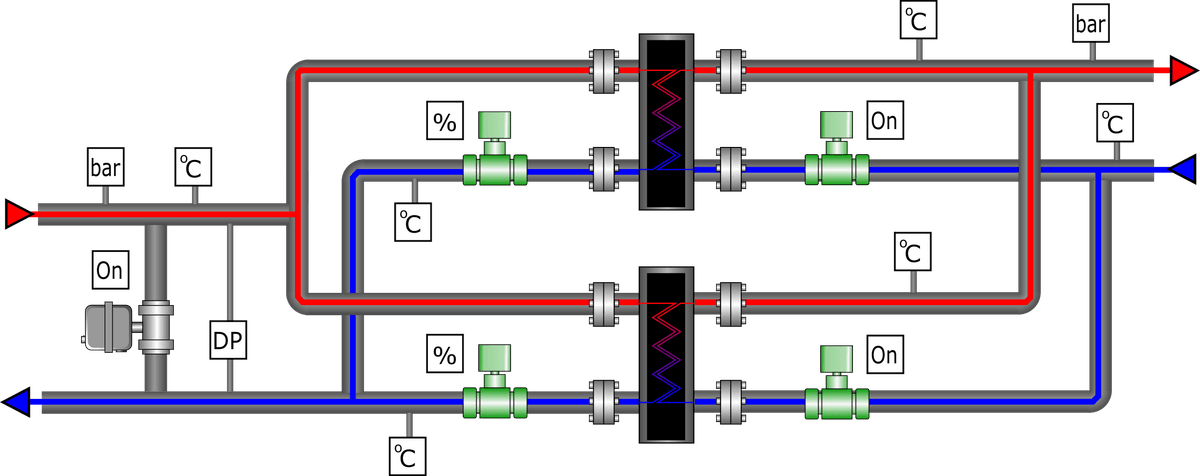
The sub-station detailed here makes use of two plates to provide redundancy or duty/assist operation.
The full topic would start with:
network_id/publisher_id/
Where network_id is the network index number (= field 1), and publisher_id is the user name for access to the database (the substation control panel).
For example, the topic for a substations output temperature may look like:
myNetwork/subStB2/subSt/dat/tCo
Not all topics will be present as some sensors may not be included, for example flow rate readings require the inclusion of heat meter data typically.
Substation Entities
| Entity (device_id) | Description |
|---|---|
| subSt | Sub-station |
| phex1 | Plate heat exchanger circuit 1 |
| phex2 | Plate heat exchanger circuit 2 |
Substation Fields
| Device | Group | Key | Description | Units |
|---|---|---|---|---|
| subSt | settings | tSet | Setpoint temperature | °C |
| settings | hRun | Hours run time between plate changeovers | hours | |
| settings | tAp | Minimum approach temperature (primary hot to secondary hot) | °C | |
| settings | xpOn | Maximum valve position before extra (assist) plate turns on | % | |
| settings | xpOff | Valve position before assist plate turns off (typically 25% of vPosMax) | % | |
| settings | tMin | Low temperature alarm | °C | |
| settings | tMax | High temperature alarm | °C | |
| system | ipLan | IP address on network | ||
| system | ver | Software version | ||
| stat | serial | Substation serial number | ||
| stat | model | Substation model | ||
| stat | manufacturer | Substation manufacturer | ||
| stat | hHRun | Hours historic run time | hours | |
| stat | mwh | Energy input to date | MWh | |
| stat | m3 | Primary volume to date | m3 | |
| stat | vwart24 | Volume weighed return temperature for past 24 hours | °C | |
| stat | v24 | Volume weighed return temperature for past 24 hours | litres | |
| stat | alarmCount | Alarm counter (since last reset) | °C | |
| dat | tH | Primary (hot) incoming temperature | °C | |
| dat | tHo | Primary outgoing temperature from substation (mixed output) | °C | |
| dat | tC | Secondary (cold) incoming temperature | °C | |
| dat | tCo | Secondary outgoing temperature from substation (mixed output) | °C | |
| dat | fH | Primary flow rate through substation (total) | litres/minute | |
| dat | fC | Secondary flow rate through substation (total) | litres/minute | |
| dat | dpH | Primary differential pressure | bar | |
| dat | pH | Primary static pressure | bar | |
| dat | pC | Secondary static pressure | bar | |
| alarm | tCo | Triggered when substation output temperature is too low or high | Low / High Temperature | |
| alarm | tH | Triggered when primary supply is too low | Low Temperature | |
| alarm | dpH | Triggered when primary differential pressure too low | Low DP | |
| cmd | change | Command to alternate lead plate | Unix timestamp | |
| cmd | resetAlarmCount | Reset the alarm counter | Unix timestamp | |
| cmd | refresh | Resend all data to MQTT server | Unix timestamp | |
| cmd | refreshTopic | Resend data matching topic passed in value | topic | |
| phex1, phex2 | dat | run | In operation | 0 / 1 |
| dat | st | Control state | startup / running / idle / off / alarm | |
| dat | tHo | Primary outgoing temperature from plate | °C | |
| dat | tCo | Secondary outgoing temperature from plate | °C | |
| dat | fH | Primary flow rate through plate | litres/minute | |
| dat | fC | Secondary flow rate through plate | litres/minute | |
| dat | xpV | Control valve position (valve feedback) | % | |
| dat | xpVSet | Control valve setpoint position | % | |
| stat | hHRun | Hours historic run time | hours | |
| stat | hRun | Hours run time (current session) | hours | |
| settings | hand | Run mode, Off / Normal / On | 0 / 1 / 2 | |
| warning | hand | Run mode is not normal | Turned Off / Manual Overide | |
| alarm | tCo | Triggered when plate output temperature is too low or high | low / high | |
| alarm | vPos | Failure position when control valve is not reaching setpoint | closed / open / ok | |
| alarm | power | Power tripped | trip / ok |
Heat Meters and M-Bus Devices
Heat Meters
In the topic structure, the publisher level represents the unique identifier (serial number) of the M-Bus Gateway the meter is connected to, while the device_id would be the heat meter serial number.
| Group | Key | Description | Units |
|---|---|---|---|
| stat | serial | Heat meter serial number | |
| stat | manufacturer | Heat meter manufacturer | |
| stat | model | Heat meter model | |
| stat | fNom | Heat meter nominal flow rate | m3/h |
| stat | dpNom | Pressure drop at nominal flow rate | bar |
| stat | dn | DN Size | e.g. DN20 |
| dat | tF | Temperature of primary flow | °C |
| dat | tR | Temperature of primary return | °C |
| dat | kwh | Energy used to date | kWh |
| dat | kw | Curent power | kW |
| dat | fR | Current flow rate (measured on return) | litres/minute |
| dat | m3 | Volume used to date | m3 |
Boilers
| Device | Group | Key | Description | Units |
|---|---|---|---|---|
| boilers | settings | tSet | Setpoint temperature | °C |
| settings | hRun | Hours run time between plate changeovers | hours | |
| settings | tMin | Low temperature alarm | °C | |
| settings | tMax | High temperature alarm | °C | |
| system | ipLan | IP address on network | ||
| system | ver | Software version | ||
| stat | hHRun | Hours historic run time | hours | |
| stat | mwhH | Energy input to date | MWh | |
| stat | m3H | Primary volume to date | m3 | |
| stat | vwart24 | Volume weighed return temperature for past 24 hours | °C | |
| stat | v24 | Volume for past 24 hours | litres | |
| stat | alarmCount | Alarm counter (since last reset) | °C | |
| dat | tIn | Primary incoming temperature | °C | |
| dat | tOut | Primary outgoing temperature from boilers (mixed output) | °C | |
| dat | flow | Primary flow rate through boilers (total) | litres/minute | |
| dat | dpOut | Boiler rig differential pressure | bar | |
| dat | pGas | Gas pressure | mbar | |
| dat | pIn | Inlet static pressure | bar | |
| dat | pOut | Outlet static pressure | bar | |
| alarm | tOut | Triggered when substation output temperature is too low or high | Low / High Temperature | |
| alarm | pGas | Triggered when gas pressure is too low | Low | |
| cmd | change | Command to alternate lead boiler | Unix timestamp | |
| cmd | resetAlarmCount | Reset the alarm counter | Unix timestamp | |
| cmd | refresh | Resend all data to MQTT server | Unix timestamp | |
| cmd | refreshTopic | Resend data matching topic passed in value | topic | |
| b1, b2, b3... | dat | run | In operation | 0 / 1 |
| dat | st | Control state | startup / running / idle / off / alarm | |
| dat | tIn | Temperature into boiler (post valve) | °C | |
| dat | tOut | Primary outgoing temperature from boiler | °C | |
| dat | dt | Temp drop across boiler | °C | |
| dat | flow | Primary flow rate through boiler | litres/minute | |
| dat | kw | Power currently generated | kW | |
| dat | xpV | Control valve position (valve feedback) | % | |
| dat | xpVSet | Control valve setpoint position | % | |
| stat | hHRun | Hours historic run time | hours | |
| stat | hRun | Hours run time (current session) | hours | |
| stat | serial | Boiler serial number | ||
| stat | kwRated | Boiler rated output | kW | |
| stat | model | Boiler model | ||
| stat | manufacturer | Boiler manufacturer | ||
| cmd | run | Command to run | 0 / 1 | |
| settings | hand | Run mode, Off / Normal / On | 0 / 1 / 2 | |
| warning | hand | Run mode is not normal | Turned Off / Manual Overide | |
| alarm | tOut | Triggered when output temperature is too low or high | Low / High Temperature | |
| alarm | vPos | Triggered when control valve is not reaching setpoint | Valve Fault |
Plantrooms
In addition to boilers, a plantroom in a building will have other sub-systems.
Most topics can be taken from the equivalent for a sub-station or a boiler.
| Device | Description |
|---|---|
| boilers | Boiler cascade |
| b1 | Boiler 1 |
| hp1 | Heat Pump 1 |
| phexDHW | DHW Plate heat exchanger |
| storeDHW | DHW Storage cylinder |
| storeH | Primary Buffer/Thermal Store cylinder for High Grade Heat |
| storeL | Primary Buffer/Thermal Store cylinder for Low Grade Heat |
| valveCH | Central Heating tempering valve |
| pump1CH | Central Heating Pump 1 |
| pump2CH | Central Heating Pump 2 |
| pressure | Pressurisation set |
| gas | Gas safety system |
Block of Load
E.g. a building.
The main purpose of blocks is to collate performance data and alarms from devices in a group, to produce a summary that can be passed up the line with minimal data footprint.
Individual device values are not so important as total and average values. Key block metrics would normally be provided over past 24 hours.
At a hardware level, MQTT devices responsible for producing block data (from a stream of HIU data for example) would require persistent data storage (locally or remotely) in order to calculate long term statistics. As data is summarised at the block level, there is no persistent storage of end-device data (such as HIU data).
| Group | Key | Description | Units |
|---|---|---|---|
| stat | name | Block name | |
| stat | htmlReport | A status report on the block, including performance and alarm information | |
| stat | nProp | Number of properties | |
| stat | nPeople | Number of occupants (fully occupied) | |
| stat | typeProp | Property type | residential / hotel / office |
| stat | serialHm | Block entry heat meter serial number | |
| stat | fDHW | totalled primary flow rate for DHW loads | litres/minute |
| stat | fCH | totalled primary flow rate for CH loads | litres/minute |
| stat | fWarm | totalled primary flow rate for standby (keep warm) flow - i.e. not DHW or CH | litres/minute |
| stat | tRDHW | Weighed return temperature for DHW loads | °C |
| stat | tRCH | Weighed return temperature for CH loads | °C |
| stat | tRWarm | Weighed return temperature for standby flow | °C |
| stat | vwart24 | VWART (volume weighed average return temperature) for past 24 hours | °C |
| stat | v24 | Volume for past 24 hours | litres |
| stat | vwaft24 | Volume weighed average flow temperature for past 24 hours | °C |
| stat | vwartDHW24 | VWART for past 24 hours, Domestic Hot Water | °C |
| stat | vDHW24 | Volume for past 24 hours, Domestic Hot Water | litres |
| stat | vwartCH24 | VWART for past 24 hours, Central Heating | °C |
| stat | vCH24 | Volume for past 24 hours, Central Heating | litres |
| stat | vwartJan | VWART for last January | °C |
| stat | vJan | Volume for last January | litres |
| stat | nAlarms | Number of current alarms | |
| stat | nWarnings | Number of current warnings | |
| stat | tFMin24 | Lowest flow temperature over past 24 hours | °C |
| stat | tFMax24 | Peak flow temperature over past 24 hours | °C |
| stat | kwMax24 | Peak load over past 24 hours | kW |
| stat | kwDHWMax24 | Peak DHW load over past 24 hours | kW |
| stat | kwCHMax24 | Peak CH load over past 24 hours | kW |
| stat | fMax24 | Peak flow rate over past 24 hours | litres/minute |
| stat | fDHWMax24 | Peak flow rate over past 24 hours | litres/minute |
| stat | fCHMax24 | Peak CH flow rate past 24 hours | litres/minute |
| dat | tF | Temperature of primary flow | °C |
| dat | tR | Temperature of primary return | °C |
| dat | kw | Curent load | kW |
| dat | fR | Current flow rate | litres/minute |
| dat | dp | Differential pressure (across load) | bar |
| dat | dpIn | Differential pressure (pre-Differential Pressure Valve) | bar |
| dat | pF | Static pressure, primary flow | bar |
| dat | pR | Static pressure, primary return | bar |
Hydraulic Interface Units (HIUs)
Note that some legacy names are still to be adjusted to camel case.
See Node-HIU Switch.
The following table shows the structure of standard topics available for each HIU.
Readings
| Group | Key | Description | Units |
|---|---|---|---|
| dat | tCHo | Temperature of flow to central heating | °C |
| dat | tH | Temperature of primary flow | °C |
| dat | tHoCH | Temperature of primary return on central heating | °C |
| dat | tCo | Temperature of DHW flow to taps | °C |
| dat | tHoDHW | Temperature of primary return on DHW | °C |
| dat | last_tCo | Last recorded tap use, DHW supply temperature | °C |
| dat | last_tH | Last recorded tap use, primary supply temperature | °C |
| dat | last_tHoDHW | Last recorded tap use, primary return temperature | °C |
| dat | TTdhw | Setpoint temperature for DHW | °C |
| dat | fHCH | Flow rate on primary for central heating | ltr/min |
| dat | fC | Flow rate of DHW to taps | ltr/min |
| dat | fHDHW | Flow rate on primary for DHW | ltr/min |
| dat | dpH | Differential pressure on primary circuit | bar |
| dat | pCH | Central heating pressure | bar |
| dat | stat | Call for central heating (room thermostat) on volt free wiring connection | 0 / 1 |
| dat | pump | Pump activated | 0 / 1 |
| dat | xCH | Central heating valve position | 0-270 |
| dat | xDHW | DHW valve position | 0-270 |
| dat | st | System state | |
| dat | eS | Error state | |
| dat | eT | Time in error state | seconds |
| dat | vH | Volume drawn on primary since boot | litres |
Settings
| Group | Key | Description | Units |
|---|---|---|---|
| settings | setpoint | Setpoint temperature for DHW | °C |
| settings | WarmupBoost | Boost flow rate when flushing cold primary feed | ltr/min |
| settings | EcoMode | Keep warm mode | eco / comfort |
| settings | PressureMode | Differential pressure calculation mode | auto / bar |
| settings | PowerUpCounter | Number of times the HIU controller has been powered | |
| settings | ErrorCounter | Time in error state | seconds |
| settings | DHReturnLimit | Central heating primary return limit | °C |
| settings | HESupply | Maximum central heating supply temperature | °C |
| settings | PumpTimeout | Central heating pump over-run | seconds |
| settings | PumpProtection | Pump low pressure protection enabled | 0 / 1 |
| settings | HEProtectionMode | Central heating return limit enabled | 0 / 1 |
| settings | DHWExchangerAntiLegionella | Anti-Legionella cycle enabled | 0 / 1 |
| settings | DHWExchangerEcoHeatTemperature | Keep warm temperature | °C |
| settings | DHWExchangerEcoHeatTime | Keep warm timer | minutes |
| settings | CentralHeatingControl | Central heating enabled | 0 / 1 |
| settings | PrePayShutOff | HIU enabled (for prepay control) | 0 / 1 |
Statistics
| Group | Key | Description | Units |
|---|---|---|---|
| stat | vC | DHW accumulated total | litres |
| stat | DHWCount | Number of tap uses | |
| stat | e_TEMPERATURESENSORS | Error relating to temperature sensors | |
| stat | e_FLOWSENSOR | Error relating to DHW flow sensor | |
| stat | e_PRIMARYCONTROL | Error relating to valves | |
| stat | e_DISTRICTHEATING | Error relating to heat network | |
| stat | e_CHRETURNTEMP | Error relating to central heating return sensor | |
| stat | e_DHWTEMP | Error relating to DHW temperature sensor | |
| stat | e_DISTRICTHEATINGTEMP | Error relating to heat network temperatures | |
| stat | e_DHRETURNTEMP | Error relating to DHW return sensor | |
| stat | e_CENTRALHEATING | Error relating to central heating | |
| stat | e_WARMUPTIMER | Error relating to warm-up times | |
| stat | e_CHTEMPWARNING | Warning relating to central heating temperatures | |
| stat | e_CHTEMPERROR | Error relating to central heating temperature sensor | |
| stat | tis | Time in current state | seconds |
| stat | beacon | HIU alive beacon |
System Variables
| Group | Key | Description | Units |
|---|---|---|---|
| system | node | A unique identifier for the Node-HIU Switch | |
| system | network | A unique identifier for the network | |
| system | Serial | The serial number of the HIU | |
| system | lastcontact | The time the HIU last made contact | |
| system | time | The unix time the HIU last made contact | |
| system | property | The property location | |
| system | Firmware | HIU firmware version | |
| system | CPUcore_1 | Node processor 1 usage | % |
| system | CPUcore_2 | Node processor 2 usage | % |
| system | CPUcore_3 | Node processor 3 usage | % |
| system | CPUcore_4 | Node processor 4 usage | % |
| system | CPUMemory | Node memory usage | % |
| system | iplan | IP address on local network | |
| system | mac | MAC address | |
| system | ipwan | IP address on internet | |
| system | tempid | Temporary (weekly) id for HIU | |
| system | usb | USB port identifier for HIU | |
| system | Nodeware | Node software version |
Node Settings
| Group | Key | Description | Units |
|---|---|---|---|
| local | n_tempid | Temporary id | |
| local | n_logtosd | Log data to SD card | |
| local | n_logtoheatweb | Log data to heatweb.info | |
| local | n_logtopool | Log DHW data to public data pool under temporary (anonymous) id | |
| local | n_ptype | Property type | |
| local | n_flow | Node-red flow template | |
| local | n_network | Network id | |
| local | n_rolemodel | Node-red flow template author system | |
| local | n_SYSid | heatweb.info id | |
| local | n_node | Node id | |
| local | n_readonly | read only file system | |
| local | n_email | Administrator email address | |
| local | n_runcount | Node power-up counter |
JSON
JSON is the web standard for describing data. It is best explained with a demonstration.
Given we have two PCDB data fields to store (as an example) we may have:
myNetwork/aab3458cd2ef345c/net/stat/idN = 12345678
myNetwork/aab3458cd2ef345c/net/stat/des = "This is an example heat network"
In JSON this would look like (formatted):
{
"MyNetwork": {
"aab3458cd2ef345c": {
"net": {
"stat": {
"idN": 12345678,
"des": "This is an example heat network"
}
}
}
}
}
Or unformatted:
{"MyNetwork":{"aab3458cd2ef345c":{"net":{"stat":{"idN": 12345678,"desNet":"This is an example heat network"}}}}}
Timestamped Data
To store data with Unix timestamps, the format would be as follows (for the output from a boiler over time for example):
{
"MyNetwork": {
"aab3458cd2ef345c": {
"b1": {
"dat": {
"tOut": {
"1551374962": 75.4,
"1551374972": 74.5,
"1551374982": 73.7,
"1551374992": 72.3,
"1551375002": 71.8
}
}
}
}
}
}
Non-Protocol Related Standards
MQTT Ports
The default port for MQTT is 1883.
IP Addresses
| IP | Functions |
|---|---|
| 192.168.x.99 | |
| 192.168.x.98 | Communications Touch Screen Panel |
| Secondary MQTT Server | |
| 192.168.x.97 | VPN Server |
| 192.168.x.96 | Primary Node-RED Logic Controller |
| Primary MQTT Server |
| IP | Device | Hardware |
|---|---|---|
| 192.168.x.101-109 | Analogue Inputs | ED-549 |
| 192.168.x.111-119 | Analogue Outputs | ED-560 |
| 192.168.x.121-129 | Digital Inputs | ED-516 |
| 192.168.x.131-139 | Digital Outputs | ED-527 |
| 192.168.x.141-149 | One-Wire Interface | |
| Modbus Master | Temp Sensors | |
| Pressurisation Unit | ||
| 192.168.x.151-159 | Modbus Slave | BMS Interface |